If you’re preparing for a CMMC assessment, scope is the first thing you need to get right. It decides which systems get evaluated, how long the assessment takes, and how much it costs. Get it wrong, and you either fail the assessment or spend money securing things that never needed to be in scope.
What a CMMC Assessment Scope Actually Is
A CMMC assessment scope is the defined set of assets, systems, people, and processes in your environment that will be evaluated against CMMC security requirements. According to the DoD CIO CMMC Scoping Guide, the assessment scope is defined in 32 CFR § 170.19(c) and specifies exactly which assets will be reviewed.
Think of it as drawing a boundary around the part of your business that touches sensitive government information. Everything inside that boundary gets assessed. Everything outside it does not.
Here’s the part most contractors miss: you propose the boundary, not the assessor. You define your scope, document it, and present it during the pre-assessment. The assessor can challenge it, especially if it leaves obvious gaps. So your scope needs to be defensible, not just convenient.
The boundary is driven by one thing above all else: the flow of sensitive information. For a Level 1 assessment, that’s Federal Contract Information (FCI). For a Level 2 assessment, it’s Controlled Unclassified Information (CUI). Find where that data lives, moves, and gets processed, and you’ve found your scope.
Start With the Data: FCI vs. CUI
Before you can scope anything, you need to know which type of protected information your contracts involve.
FCI is information provided by or generated for the government under a contract. It is not intended for public release. CUI is more sensitive. It’s information the government requires you to safeguard under specific rules, often referenced in DFARS 252.204-7012.
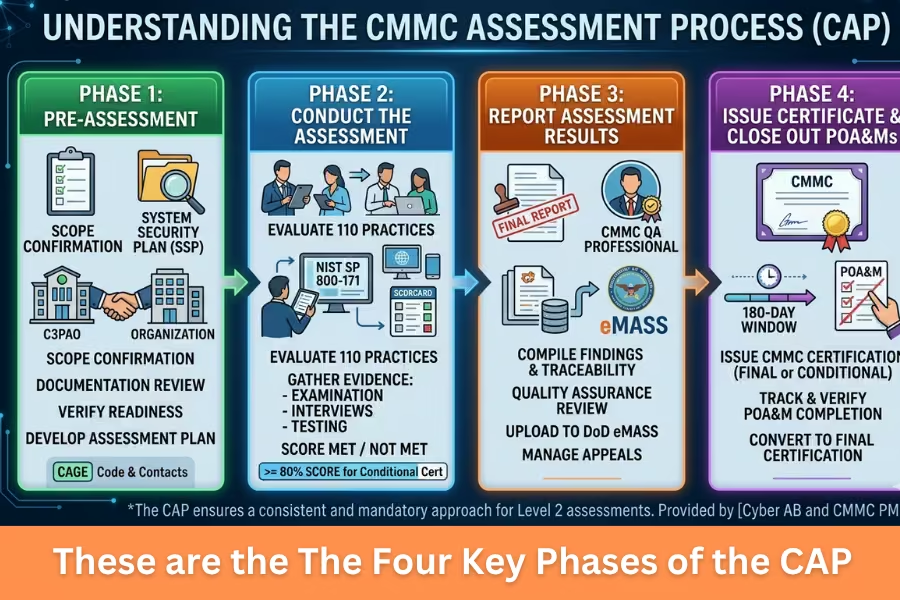
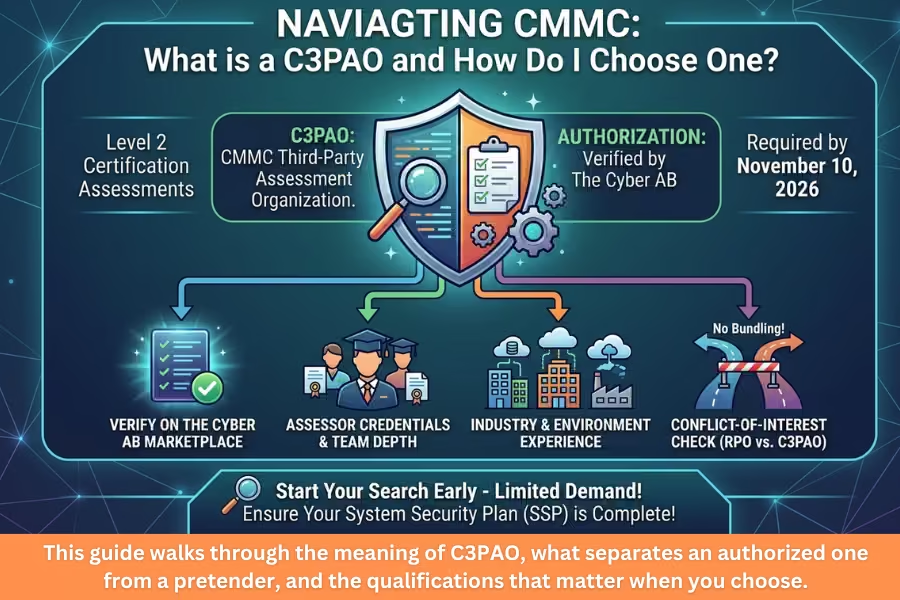
The level you’re assessed at depends on the data. Contracts involving only FCI generally call for a Level 1 self-assessment. Contracts involving CUI require a Level 2 assessment, typically conducted by a Certified Third-Party Assessment Organization (C3PAO).
Check your contract language first. Look for references to CUI, DFARS 7012, and any markings on documents you receive. If you’re unsure whether something is CUI, the National Archives CUI Registry is the authoritative reference for what counts.
This step matters because misidentifying CUI is one of the most common scoping mistakes. Label something as CUI when it isn’t, and you inflate your scope. Miss real CUI and you’ll fail.
The Five Asset Categories for a Level 2 Scope
For a Level 2 assessment, every asset in your environment has to fall into one of five categories. The CMMC Level 2 Scoping Guide and 32 CFR § 170.19(c)(1) define them. Here’s what each one means.
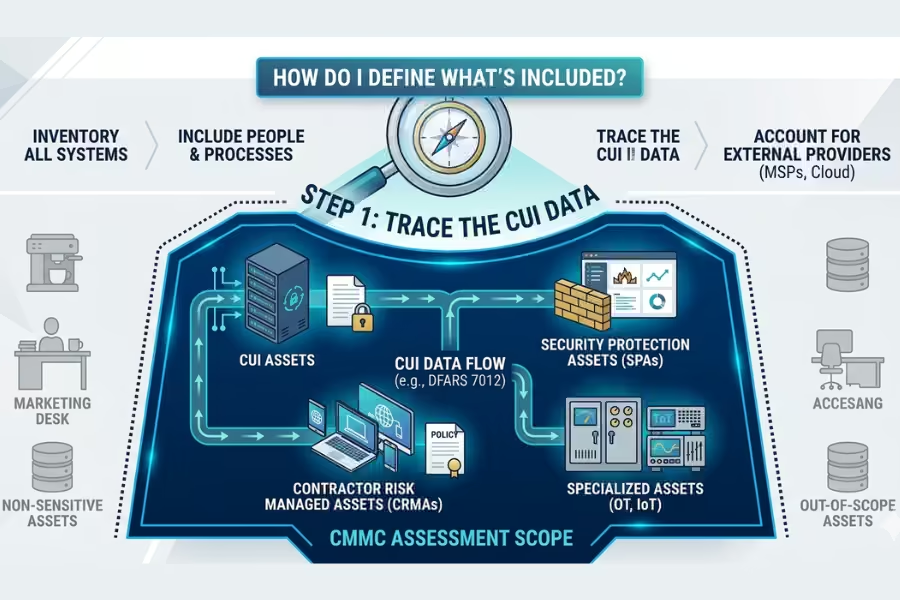
- CUI Assets. These process, store, or transmit CUI. They are fully within scope and are assessed against all 110 Level 2 security requirements. Examples include file servers holding CUI, the laptops engineers use to work on it, and email systems that carry it.
- Security Protection Assets (SPAs). These provide security functions for your in-scope environment, whether or not they directly touch CUI. As the DoD CIO Scoping Guide explains, an external provider running a SIEM service may never process CUI, but it still helps meet your CMMC requirements. Firewalls, switches, log servers, and endpoint protection tools fall under this category. They’re assessed against the requirements relevant to the protection they provide.
- Contractor Risk Managed Assets (CRMAs). These can access CUI but aren’t intended to do so, and you manage that risk through policy and controls. Examples include shared IT infrastructure and BYOD devices. They’re in scope, but if you document them well in your System Security Plan, the assessor may not test them against every requirement. Document them poorly, and the assessor can run a limited check or reclassify them as CUI Assets.
- Specialized Assets. These may or may not process CUI and are hard to secure with standard controls. The Scoping Guide lists five types: Government Furnished Equipment, IoT and IIoT devices, Operational Technology, Restricted Information Systems, and test equipment. They’re in scope and must appear in your SSP, but they aren’t assessed against the full set of controls. The assessor verifies they’re identified and managed under your risk-based policies.
- Out-of-Scope Assets. These don’t process CUI, don’t provide security protections for it, and are separated from your CUI environment. Marketing systems with no CUI access are a typical example. They don’t need to be documented or assessed.
One warning on Specialized and Out-of-Scope assets. Calling something “specialized” or “out of scope” doesn’t make it so. If an asset sits on the same network as CUI systems, assessors will want justification. You have to show how the risk is contained through segmentation, limited access, or compensating controls.
How to Actually Define Your Scope, Step by Step
Knowing the categories is one thing. Putting your environment into them is the real work. Here’s a practical sequence.
- Identify where CUI exists. Start with your contracts. Find every place CUI enters your organization, every system it passes through, and every point where it leaves. This is your CUI data flow.
- Map the data flow end-to-end. Trace CUI from receipt to disposal. Email, file shares, cloud apps, backups, endpoints, printers. Every touchpoint is a candidate for scope. If unencrypted CUI moves through a system, that system is in.
- Inventory your assets. Build a complete list of hardware, software, and services that interact with CUI or its environment. Then label each item with one of the five categories.
- Include people and processes, not just machines. Scope isn’t only technology. Anyone who handles CUI is in scope. That often reaches beyond engineering into contracts, legal, finance, and security. Map the roles, not just the racks.
- Account for external providers. If a Managed Service Provider, cloud platform, or other External Service Provider touches your CUI, they affect your scope. Review their shared responsibility matrix to see which controls they own and which you own.
- Draw the boundary. Document everything in your SSP, your asset inventory, and your network diagrams. Your network diagram should clearly show the assessment scope, the CUI environment, and any external connections. A clearly marked authorization boundary helps the assessor confirm they’re reviewing the right systems.
Do this thoroughly, and your pre-assessment scoping discussion goes smoothly. Skip steps, and you invite challenges.
RELATED: How Do I Reduce My CMMC Assessment Scope for External File Sharing?
Use Scope Reduction to Your Advantage
The wider your scope, the more systems you have to secure, document, and maintain. That drives up cost and effort. Smart contractors shrink the scope deliberately.
The most effective method is a CUI enclave. An enclave is a logically or physically isolated segment of your environment built specifically to hold and process CUI. Instead of bringing your entire network into scope, you architect a tightly controlled zone where CUI lives and keep everything else out.
When done well, an enclave can sharply reduce the number of in-scope assets. It also gives your team a clear, auditable boundary to manage over time. Enclaves can be on-premises, cloud-based, or hybrid.
Two things to keep in mind. First, segmentation has to be real. A firewall has to actively block traffic between the out-of-scope segment and the CUI environment. A policy that says “nobody does that” is not separation. It’s a CRMA waiting to be reclassified during your audit.
Second, watch your shared services. Domain controllers, DNS, and backup systems that support both your CUI environment and your general network usually get pulled into scope. Plan for that when you design the enclave.
If part of your business handles only FCI while another part handles CUI, you don’t have to certify the whole organization at Level 2. You can scope the CUI work within an enclave and assess only that scope.
RELATED: CMMC Scoping Guide: How to Avoid Scope Creep
Common Scoping Mistakes That Trip Up Contractors
A few errors keep showing up, and each one is avoidable.
- Misclassifying a CUI Asset as a CRMA is the costliest. CRMAs receive lighter treatment if well documented, so it’s tempting to file assets there. But if that asset actually processes CUI, you’ve understated your scope and risk a failed assessment.
- Drawing the boundary too wide is the quieter mistake. It doesn’t fail you; it just drains money. You end up securing and documenting systems that never needed to be in scope at all.
- Treating policy as separation is another. Telling an assessor that staff “don’t use that system for CUI” won’t hold. Without an active technical control blocking the data flow, that asset comes into scope.
- Forgetting people and processes is common, too. Scope isn’t only servers and laptops. Anyone who handles CUI is in scope, which often extends to contracts, finance, and legal.
If you’re early in the process, begin with your data. Find your CUI, trace where it goes, and let that flow draw your boundary. Everything else in scoping follows from that single step.